



Most businesses treat their software like a digital filing cabinet when it should be the engine room. If you’re tired of watching hours vanish into the void of manual data entry or hunting for customer info across five different tabs, you aren’t alone. It’s a common friction point that stalls growth and spikes error rates. You already know the frustrating reality of a “simple” task taking all afternoon just because your tools won’t talk to each other.
By shifting from static processes to dynamic online applications, you can finally turn that friction into a competitive advantage. You’re going to learn how to transform sluggish manual tasks into high-performing digital tools that actually move the needle. We’ll explore how to build for enterprise-grade scalability, ensure your data handling meets the 2026 CCPA privacy requirements, and create a unified workflow that grows with your company. It’s time to stop fighting your software and start letting it do the heavy lifting.
Key Takeaways
- Understand the core difference between a static site and functional online applications that actively handle your business logic.
- Take the “tripling test” to determine if your current manual processes are a bottleneck that will break as your customer base grows.
- Master a 4-step development roadmap that prioritizes strategic planning and architecture before any coding begins.
- Identify the three specific metrics—time saved, user retention, and error reduction—to calculate the real ROI of your digital tools.
What is an online application in the modern business world?
Let’s clear up the confusion immediately. We aren’t talking about job boards or college admissions platforms. In a professional context, online applications are web-based software tools designed to perform specific, often complex, business tasks. Think of a static website as a digital brochure; it looks nice and provides information. An application is more like a digital employee. It takes orders, calculates shipping costs, or manages your team’s schedule while you focus on the big picture.
By 2026, the shift from “off-the-shelf” software to custom-built solutions has become a necessity for companies that want to stay agile. Standard software often forces you to change your workflow to fit its limitations. Custom builds do the opposite. They are built around your existing success, automating the parts that slow you down without breaking what already works.
Providers like Dover Applications help facilitate this shift by developing custom enterprise systems designed to streamline internal processes and eliminate the inefficiencies of generic software.
The difference between a form and a functional app
A simple contact form is a one-way street. It collects a name and an email, then fires it into your inbox. That is just data collection. A functional application is a two-way conversation. Imagine a custom client portal where a customer logs in, views their specific project timeline, and triggers an automated invoice based on their contract. This is where Business Logic lives. It is the difference between a bucket that holds water and a plumbing system that delivers it exactly where it needs to go.
Why spreadsheets are killing your growth
We’ve all been there. You have one “Master Spreadsheet” that ten different people edit. Eventually, someone accidentally deletes a cell, a formula breaks, and suddenly your inventory count is off by a mile. This is “spreadsheet hell.” It is slow, prone to human error, and a massive security risk. When your data is fragmented across various files, you simply cannot scale.
Moving toward custom web development replaces those fragile files with a robust, centralized system. It secures your data, automates the repetitive entry tasks, and ensures that everyone on your team is looking at the same “source of truth.” It’s about trading manual frustration for digital precision.
How to decide if you need a custom online application
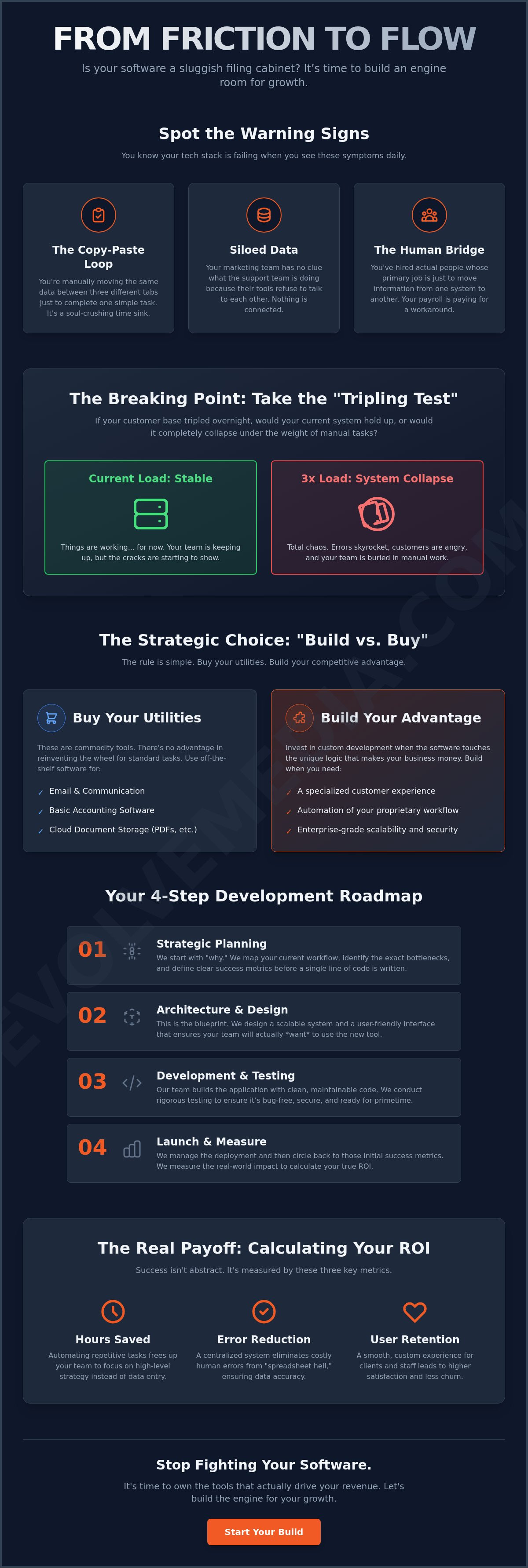
Deciding to invest in a custom tool isn’t about chasing the latest tech trend. It’s a strategic decision based on your specific growth trajectory. Ask yourself a simple question: if your customer base tripled tomorrow, would your current system hold up, or would it collapse under the weight of manual tasks? If the answer involves you or your team working 80-hour weeks just to keep the lights on, you’ve reached a plateau that off-the-shelf software can’t fix.
Successful online applications act as a force multiplier. They take the unique logic that makes your business special and bake it into a platform that doesn’t get tired or make typos. While generic software is great for standard tasks, it often lacks the flexibility needed to drive deep user engagement or protect your proprietary data. It’s a linear trap. More customers shouldn’t automatically mean more headaches.
Signs your current tools are failing
Your tech stack should be a silent partner, not a daily source of stress. You know you’re in trouble when you see these specific symptoms:
- The Copy-Paste Loop: You’re manually moving data between three different browser tabs just to finish one order.
- Siloed Data: Your marketing team has no idea what your support team is doing because their tools don’t talk to each other.
- The Human Bridge: You’ve hired people whose primary job is just to move information from one system to another.
Efficiency isn’t just a buzzword; it’s your profit margin. Every minute spent on manual entry is a minute stolen from high-level strategy. If you’re feeling the friction of outdated systems, it might be time to chat with a specialist about your workflow to see what’s possible.
The “Build vs. Buy” framework
We often help clients navigate the “Build vs. Buy” crossroads. The rule of thumb is simple. Buy your “utilities,” which are things like email, basic accounting, or document storage. These are commodities. There’s no competitive advantage in having a custom-built email client or a unique way to save a PDF.
However, you should build when the software touches your unique business logic. If your workflow is specific to your industry, or if you need a specialized customer experience that sets you apart from the competition, a custom build is the only way to go. You can learn more about how we help businesses make these strategic choices on our about us page. It’s about owning the tools that actually drive your revenue.
The 4-step roadmap to building your online application
Don’t build a skyscraper on a swamp. It sounds obvious, but many businesses rush straight into writing code before they’ve even checked the soil. In the world of online applications, your foundation is your strategy. While 84% of developers now use AI to speed up their workflows, the most expensive mistakes still happen in the planning phase. If you skip the blueprint, you’ll end up with a digital tool that looks pretty but fails to solve your actual problems.
Approaching development as a human process rather than a purely technical one ensures your tool actually gets used. It’s about building a lifecycle that includes reliable hosting and long-term stability. You want a partner, not just a vendor, to help you navigate these stages.
Step 1: Mapping the user journey
Start by interviewing the people who will actually use the tool. Your team knows exactly where the friction is. Instead of asking for a list of features, focus on the “Jobs to be Done.” What is the specific goal a user needs to achieve? This phase is all about User Experience (UX) Design. It’s the difference between a tool that feels intuitive and one that requires a 50-page manual. If your team spends more time fighting the interface than doing their work, the design has failed.
Step 2: Choosing the right tech stack
Think of your tech stack as the engine, the chassis, and the fuel of your application. You need components that work together without constant friction. In 2026, many projects utilize frameworks like React 19.2 or Next.js 16.1.4 to ensure the app stays fast and responsive. You don’t need to know every line of code, but you do need to ensure your stack is built for scalability. It should handle ten users today and ten thousand next year without a total rewrite.
Step 3: Development and iterative testing
We believe in the “Release Early, Test Often” philosophy. Don’t wait six months to see if a feature works. Run a 3-day A/B test on a specific workflow to see which version helps your team move faster. This is also where security becomes non-negotiable. With the 2026 CCPA updates requiring mandatory risk assessments for sensitive data, your development process must prioritize privacy from day one. You can’t bolt security on at the end; it has to be part of the build.
Building a custom tool is a big step, but you don’t have to walk the path alone. If you’re ready to stop guessing and start building, reach out to our development team to get your roadmap started.
Measuring success: Is your application actually working?
Launching your tool is just the start line. You’ve invested time and capital, so you need to know if your online applications are pulling their weight or just taking up server space. Real success isn’t measured by a lack of bugs. It’s measured by the tangible impact on your bottom line. If your team is still complaining about the same bottlenecks, the tool isn’t working yet.
Calculating the ROI of a custom build involves looking at more than just the price tag. You have to weigh the initial development against the long-term gains in speed and accuracy. Remember that technology is a marathon, not a sprint. Your software should be a living asset that evolves as your company grows.
Key Performance Indicators (KPIs) for web apps
- Metric 1: Task completion time. Measure how much faster your team moves. If a custom portal cuts a 30-minute manual entry task down to five minutes, you’ve just reclaimed 25 minutes of profit per transaction.
- Metric 2: User engagement rate. Check the logs to see if customers are actually using the portal. If they’re still calling your office for basic updates, your interface needs a tweak.
- Metric 3: Maintenance costs vs. labor savings. Industry data shows that ongoing maintenance and infrastructure typically cost 15-20% of the initial development annually. If that cost is lower than the salary of the manual labor you’ve replaced, you’re winning.
Don’t overlook the role of stability. In the world of online applications, uptime is a performance metric. This is why professional hosting and managed support are non-negotiable. Every minute of downtime is a minute of lost revenue and frustrated users.
Scaling for the future
Smart leaders start planning for Version 2.0 before Version 1.0 is even live. Use feedback loops from your staff to find the next friction point. Maybe the first version solved the data entry problem, but now you need a way to automate the reporting. This iterative approach ensures your digital tools never become a bottleneck.
Your growth shouldn’t be limited by the software you use. It should be propelled by it. Ready to build? Let’s chat about your project.
Stop fighting your workflow and start leading it
Scaling a business is already hard enough without your software working against you. We’ve covered how to spot the signs of a failing system and the exact roadmap needed to build a tool that actually fits your specific logic. By shifting your focus from manual entry to automated online applications, you aren’t just saving time; you’re reclaiming your company’s potential for growth. It’s about building a foundation that stays solid even when your customer base triples.
At Evolve Media, we don’t just build apps and walk away. Since our founding in 1996, we’ve seen every tech trend come and go. We know that long-term stability requires more than just good code. It requires expertise in complex business logic and reliable managed hosting to keep your operations running smoothly. We’ve helped countless partners turn digital friction into a competitive edge that lasts for decades, not just a few months.
Your next level of growth is waiting on the other side of a better workflow. Let’s build something that works—contact Evolve Media today. You’ve got the vision, and we have the tools to make it a reality.
Frequently Asked Questions
What is the average timeline for building a custom online application?
Most projects take between three to nine months to move from the initial mapping phase to a live launch. A simple tool focused on a single task might be ready in about twelve weeks, while complex systems with deep business logic require more time for testing and refinement. It’s usually best to launch a core version first so your team can start seeing results while we build out secondary features.
How much does it cost to develop a custom business app in 2026?
The investment for developing online applications varies based on the features you need and the complexity of your data. While off-the-shelf software has a flat monthly fee, custom builds are priced based on the specific architecture required to support your unique workflow. It’s better to view this as a long-term asset that reduces your overhead rather than a one-time expense that just sits on a shelf.
Can an online application integrate with my existing CRM or accounting software?
Yes, modern applications are designed to talk to other systems through APIs. Whether you use a popular CRM or a specialized accounting tool, your custom app can act as a bridge to eliminate manual data entry. This ensures your sales data and financial records stay synced without someone having to copy and paste info between different browser tabs all day.
What is the difference between a web app and a mobile app?
A web app runs directly in your browser and works on any device with an internet connection. A mobile app is downloaded from an app store and is built specifically for a phone’s operating system like iOS or Android. For most internal business workflows, a web-based application is more cost-effective because it doesn’t require separate builds for different types of phones.
How do I ensure my online application is secure from data breaches?
Security starts with a privacy-first build that includes end-to-end encryption and regular vulnerability scans. In 2026, compliance with the updated CCPA is mandatory, requiring strict risk assessments for any sensitive data processing. We focus on building secure architectures and providing managed hosting to ensure your online applications stay protected from evolving threats without slowing down your team.
Do I need to hire a full-time developer to maintain my application?
You don’t need a full-time developer on your payroll to keep things running smoothly. Most businesses partner with an agency for ongoing maintenance and hosting support. This gives you access to a whole team of specialists for a fraction of the cost of a single full-time hire, ensuring your application stays updated and secure as technology continues to change.


