
Imagine it’s Friday afternoon and a customer calls because your checkout page is stuck in a loading loop. You reach out to check on your website maintenance plan for small business, only to spend the next three days playing a frustrating game of email tag while sales vanish. It’s a nightmare scenario that happens more often than most owners care to admit.
We’ve been in the digital trenches since 1996. We know that maintenance should be your “set it and forget it” insurance policy, not another item on your to-do list. You shouldn’t have to worry about hidden security holes or slow speeds that scare away customers. You have a business to run. Your website should be the engine, not the anchor.
This guide provides a no-nonsense checklist to help you vet any maintenance service. We’ll cover non-negotiable security protocols, speed benchmarks, and the communication standards you need to ensure total peace of mind. Let’s make sure your site stays fast, professional, and ready for whatever 2026 throws your way.
Key Takeaways
- Stop treating hosting like a complete solution; it’s just a parking spot, while proactive maintenance is the mechanic that keeps your engine from stalling.
- Use our 2026 checklist to vet a website maintenance plan for small business so you know exactly what you’re paying for, from firewalls to database cleanups.
- Avoid “ghost maintenance” by insisting on monthly performance reports and a clear 24-hour response guarantee for critical site updates.
- Learn why patching vulnerable plugins is the single most important step to closing the security gap that most standard hosts simply ignore.
- Shift your focus from “fixing what breaks” to long-term stability, ensuring your site stays fast and secure enough to handle your company’s growth.
Why ‘Just Hosting’ is a Dangerous Trap for Small Businesses
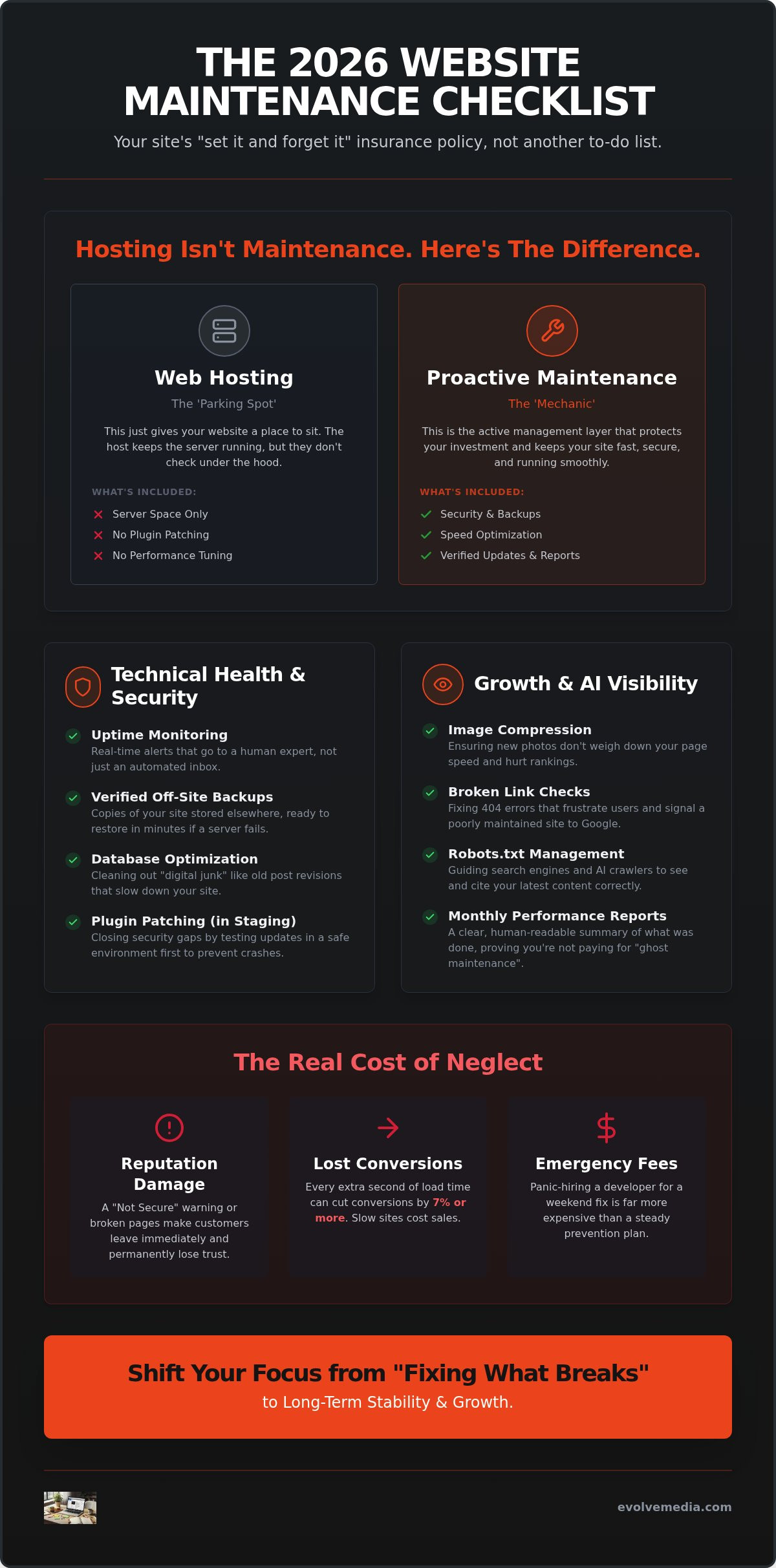
Think of web hosting as a parking spot in a busy city garage. It gives your car a place to sit, but the garage owner isn’t going to change your oil, rotate your tires, or check the engine. If you want the car to actually drive when you turn the key, you need a mechanic. That’s the core distinction between basic hosting and a website maintenance plan for small business.
Many owners fall into the trap of thinking their host handles everything. They don’t. A host keeps the server running, but they won’t patch a vulnerable WordPress plugin or fix a broken contact form. By 2026, search engines have become even more unforgiving about site health. If your site is sluggish or has minor security holes, your search visibility will vanish before you even realize there’s a problem.
The Difference Between Hosting and Maintenance
Hosting is the raw space; maintenance is the active management layer that protects your investment. While some hosts offer “automated updates,” these are often blunt instruments. They can fire off in the middle of the night and break your custom checkout page or distort your layout. A professional software maintenance approach involves human verification. We’ve found that human-verified backups are far superior to automated server snapshots, which often fail to capture the specific database states needed for a clean recovery.
The Real Cost of a ‘Broken’ Website
The hidden cost of DIY maintenance is usually paid in lost revenue and stress. If your store goes offline because of a bad update, you could be down for days while trying to find a developer who can fix it on short notice. Consider these risks:
- Reputational Damage: Seeing a “Not Secure” warning makes a huge percentage of users leave a site immediately.
- Slow Speeds: Every extra second of load time can cut conversions by 7% or more.
- Emergency Fees: Panic-hiring a developer for a weekend fix is significantly more expensive than a steady prevention plan.
Since starting Evolve Media in 1996, we’ve seen tech trends come and go, but the need for stability never changes. Prevention is always cheaper than a cure. When you have a dedicated partner watching the tech, you can focus on the parts of your business that actually make money.
The 2026 Website Maintenance Checklist: What You’re Actually Paying For
When you sign up for a website maintenance plan for small business, you shouldn’t be paying for vague promises. You’re paying for a specific set of chores that keep your digital storefront from looking like an abandoned building. In 2026, the bar is higher. It isn’t just about keeping the site online; it’s about making sure Google and AI crawlers actually like what they see. If your current provider isn’t giving you a clear list of what they’re doing every month, you might be paying for “ghost maintenance.”
Technical Health and Security Essentials
Real security isn’t just a “locked” icon in the browser. It involves daily malware scans and a web application firewall that blocks malicious bots before they even reach your login page. Following the FTC cybersecurity guidelines is a great start, but your maintenance partner should be the one doing the heavy lifting. We believe in a strict “safety first” rule: never test on a live site. Every update to your WordPress core or plugins should happen in a staging environment first. This prevents the “white screen of death” that happens when two pieces of code decide they don’t like each other. Your plan should also include:
- Uptime monitoring: Real-time alerts that go to a human expert, not just an automated inbox.
- Off-site backups: Verified copies of your site stored elsewhere, ready to restore in minutes if a server fails.
- Database optimization: Cleaning out “digital junk” like old post revisions that slow down your site.
- Image compression: Ensuring your new team photos don’t weigh down your page speed.
Growth, SEO, and AI Visibility
Your site needs to be readable by more than just humans. We now have to manage things like Robots.txt files to ensure AI crawlers see and cite your latest content correctly. If your plan doesn’t include regular checks for broken links, you’re essentially leaving digital traps for your visitors. These 404 errors can quickly tank your small business seo services results. Regular Core Web Vitals reports are also essential to keep your search rankings stable.
Beyond the tech, a good plan gives you a partner for the small stuff. Need a photo swapped or a blog post formatted? You should have a set number of hours dedicated to these “quality of life” edits. It keeps your site fresh without you having to touch a single line of code. If you’re tired of doing it all yourself, we’re always here to chat about how a managed approach can take that weight off your shoulders.
How to Spot ‘Ghost Maintenance’ and Choose the Right Partner
You’ve likely heard horror stories about agencies that take your monthly check but only show up when something breaks. This is “ghost maintenance.” It’s the technical equivalent of paying a security guard who never actually walks the perimeter. Choosing a website maintenance plan for small business shouldn’t feel like a leap of faith; it should feel like a transparent partnership where you see the work being done.
The biggest red flag? A lack of communication. If you don’t receive a monthly report detailing exactly what was updated, scanned, or optimized, there’s a good chance nothing was done. A real partner acts as an advisor, suggesting improvements before you even notice a lag. They aren’t just silent vendors; they’re invested in your growth. This relational approach is why we’ve focused on long-term stability since we started in 1996.
- The 24-Hour Rule: For a small business, a day of downtime is a disaster. Your partner should guarantee a response within 24 hours.
- Total Ownership: You must own your domain, hosting account, and files. If an agency tries to keep these in their name, they’re creating a trap, not a service.
- Proactive vs. Reactive: Does your provider call you with ideas, or do they only answer when you’ve found a bug?
Pricing Models: Hourly vs. Flat Monthly Fees
Hourly billing sounds fair until you realize it rewards inefficiency. If a task takes longer, you pay more. Flat monthly fees are generally better for budgeting and proactive care. Under a flat-rate plan, the provider is incentivized to keep your site running perfectly so they don’t have to spend extra hours fixing preventable fires. Look for “rollover hours” too. If you don’t use your content update time this month, it shouldn’t just vanish into thin air.
Questions to Ask Your Potential Maintenance Partner
Before you sign anything, put them in the hot seat. Ask: “Do you test updates on a clone of my site first?” If the answer is no, they’re testing on your live business, which is a massive risk. You also need to know their plan for the worst-case scenario. Ask what happens if the site gets hacked under their watch. A true partner will have a clear, documented recovery process ready to go. If you want to see what a real strategy looks like, contact a pro who can walk you through the specifics.
Evolve Media: 30 Years of Keeping Digital Assets Stable
Since 1996, we’ve navigated every major shift in web technology, from the early days of static HTML to the AI-driven world of 2026. We’ve seen trends sparkle and fade, but one thing remains constant: stability is the bedrock of growth. Our version of managed hosting isn’t just a server space; it’s a fortress for your brand. We don’t treat your site like a static brochure that sits on a shelf. Instead, we view it as a living application that requires constant care and professional oversight.
When you call us, you don’t get routed to a generic call center halfway across the globe. You get direct access to the experts who actually built and manage your site. This level of personal dedication is rare. We’ve spent three decades proving that a website maintenance plan for small business works best when it’s built on trust and technical authority.
A Relational Approach to Digital Growth
We focus on being a long-term advisor rather than a silent vendor. Our about us story is rooted in the idea that your digital success is our success. This partnership extends beyond just fixing bugs. We integrate your maintenance routine with your broader seo marketing agency goals to ensure your site isn’t just “up,” but actually performing. Every update we make is designed to keep your search rankings climbing and your security airtight.
Getting Started with a Proactive Plan
Moving your site to a managed environment shouldn’t be a headache. We handle the heavy lifting of migration. You don’t have to touch a thing. Every new website maintenance plan for small business begins with our initial “Deep Health Audit.” We look for hidden security holes and speed bottlenecks that hurt your bottom line. We find the cracks before they become craters. Let’s talk about a plan that actually works for you and give your business the stable foundation it deserves.
Turn Your Website Into a Growth Engine
Your website is too important to leave to chance or automated “set and forget” tools that might break your checkout page when you least expect it. By now, you know that a true website maintenance plan for small business is about more than just keeping the lights on; it’s about protecting your reputation and ensuring your site is fast enough to actually close deals. You deserve a partner who watches the technical perimeter so you can focus on running your company.
Since 1996, we’ve focused on building relational strategic partnerships rather than just being another name on an invoice. Our expert managed hosting provides the stability you need to grow without the fear of hidden vulnerabilities or slow load times. Don’t wait for a security breach or a crashed server to realize the value of proactive care. It’s much easier to maintain a fortress than it is to rebuild one from the ground up.
Get a Proactive Maintenance Plan for Your Business and let’s make sure your digital assets are built to last. We’re ready to help you build something great.
Common Questions About Website Maintenance
Do I really need a maintenance plan if my site is small?
Yes, because hackers don’t discriminate based on your company’s revenue. Automated bots crawl the web looking for any site with unpatched security holes, regardless of how many visitors you get. A small site with an old plugin is an easy target for malware, so a website maintenance plan for small business ensures you aren’t leaving the digital front door wide open.
Can’t I just update my own plugins to save money?
You certainly can, but it’s a bit like performing your own plumbing. It’s fine until a pipe bursts. When you click “update” on a live site, you risk a code conflict that could crash your entire layout or break your contact forms. Professionals use staging environments to test these changes first, ensuring your live site stays functional and professional.
What is the difference between a website maintenance plan and hosting?
Hosting provides the server space where your files live, while maintenance is the active service that keeps those files healthy. One gives you a place to exist online. The other ensures you stay secure, fast, and up to date. It’s the difference between renting a plot of land and hiring a property manager to keep the building in top shape.
How much should a small business website maintenance plan cost?
Costs depend entirely on the complexity of your site and how much hands-on support you require. Some plans focus strictly on technical security, while others include dedicated hours for text edits and blog formatting. The key is to look for a flat-rate plan that offers transparency, as “too cheap” options often skip the human testing that prevents site crashes.
Does website maintenance help with my Google rankings?
It does, primarily by keeping your site fast and mobile-friendly. Google’s algorithm rewards sites that meet specific performance benchmarks and punishes those with slow load times or security warnings. Regular maintenance ensures your technical foundations remain strong so you don’t lose your spot in the search results to more proactive competitors.
What happens if my website goes down and I don’t have a plan?
You’ll likely spend hours hunting for a developer who can help you on short notice, often paying a premium emergency fee. Without a plan, you might not have a recent, verified backup to restore. This can turn a minor technical glitch into a multi-day disaster that costs you both sales and customer trust.