
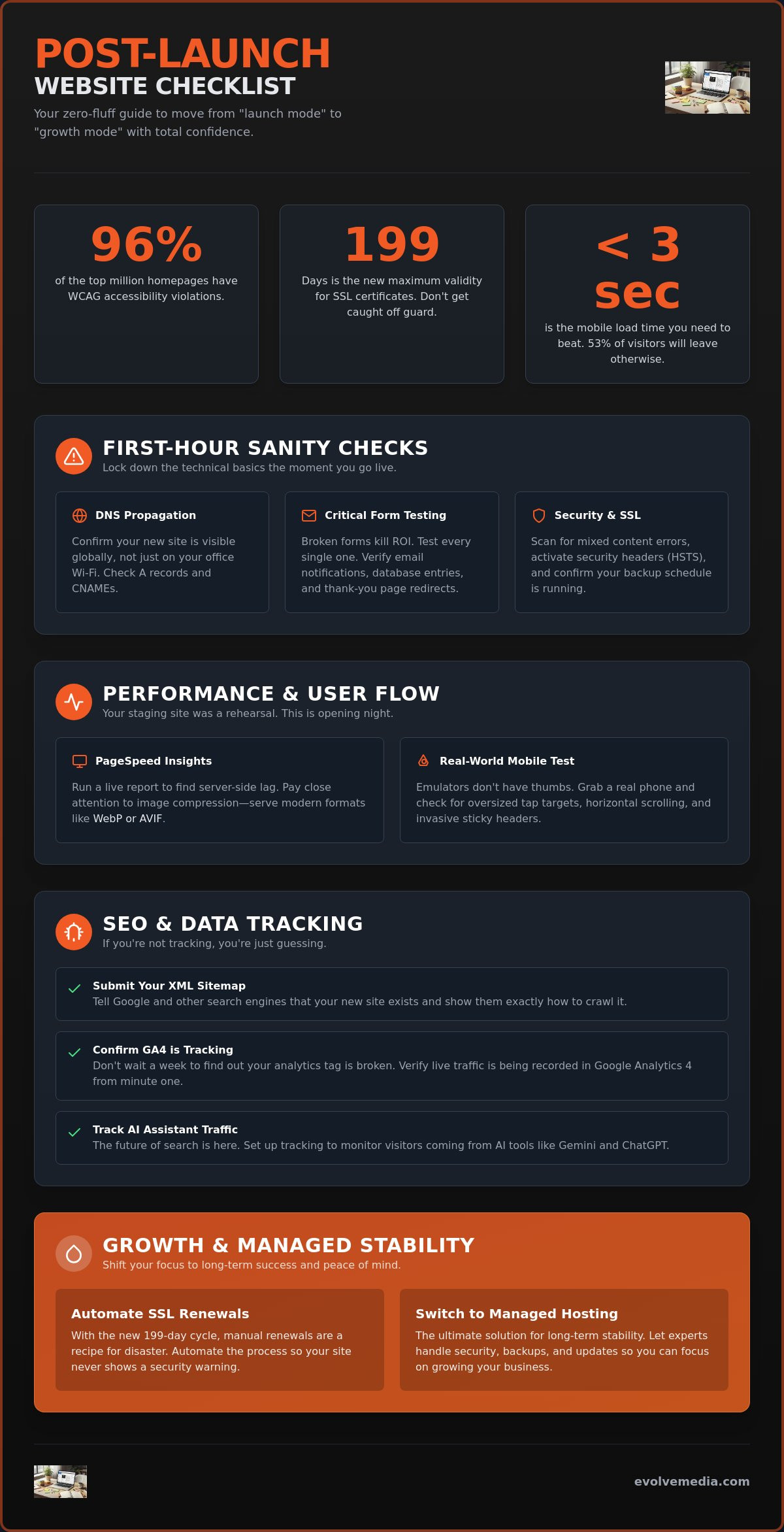
Nearly 96% of the top one million homepages currently have WCAG accessibility violations; that is a staggering number when you consider the strict ADA compliance deadlines that hit in April 2026. You’ve finally pushed your new site live, and while you want to celebrate, there’s that nagging feeling you’ve missed a broken form or an invisible SEO error. It’s a common anxiety. We’ve been launching custom online applications since 1996, and we know that the “go-live” button is actually the starting gun, not the finish line.
You deserve to sleep soundly knowing your digital flagship is stable and fast. This post-launch website checklist is a zero-fluff guide designed to help you validate your technical setup immediately. We’ll show you how to:
- Manage the new 199-day SSL certificate renewal cycle.
- Keep mobile load times under the 3-second abandonment threshold.
- Track traffic from AI assistants like Gemini and ChatGPT.
It’s time to move from “launch mode” to “growth mode” with total confidence. Let’s get to work.
Key Takeaways
- Confirm your site is actually visible to the world by verifying DNS propagation and testing every lead form to ensure messages actually hit your inbox.
- Beat the 3-second mobile abandonment rule by running a live PageSpeed report and physically clicking through your navigation on a real smartphone.
- Secure your search rankings early with this post-launch website checklist by submitting your XML sitemap and confirming GA4 is tracking live traffic.
- Stay ahead of 2026 security standards by automating your 199-day SSL renewals and switching to managed hosting for long-term stability.
Technical Sanity Checks for the First Hour
The “go-live” button has been clicked, and the initial rush of adrenaline is fading. Now comes the quiet, focused work of ensuring your digital flagship actually performs for every visitor, regardless of where they are on the globe. In the standard software release life cycle, this is the moment your project moves from a controlled environment into the wild. It’s the most vulnerable time for any new site, which is why this post-launch website checklist starts with immediate technical validation.
Your first task is verifying DNS propagation. Just because you can see the new site on your office Wi-Fi doesn’t mean your customer in London or Tokyo isn’t still looking at the old version, or worse, a “Server Not Found” error. Use a tool like DNSChecker.org to confirm your A records and CNAMEs have updated across all major global nodes. If you see “red Xs” in certain regions, don’t panic; it can take a few hours, but you need to know where those gaps exist so you can manage client expectations.
Critical Form and Checkout Testing
Broken forms are the silent killers of marketing ROI. Don’t just look at the contact page; actually fill it out. Submit a test lead to verify the email notification reaches your inbox and isn’t caught in a spam filter. We’ve seen countless launches where the site looks beautiful, but the “Contact Us” button leads to a 404 because a trailing slash was missed in the migration.
Check your database entries directly in your CMS or CRM. It’s one thing to get an email; it’s another to ensure the data is stored correctly for your sales team. Finally, verify that your thank-you page redirects trigger the right tracking pixels. If that “Success” page doesn’t fire your conversion tag, your digital marketing data will be useless from day one. If things aren’t firing correctly, you can always reach out via our contact page for a quick audit.
Security and SSL Validation
As of February 2026, the maximum validity for SSL certificates is now only 199 days. This means your SSL certificate needs to be active and properly configured for auto-renewal immediately. Use a tool like Why No Padlock to scan for mixed content errors. These happen when your secure HTTPS site tries to pull an image or script from an old HTTP URL, causing that dreaded “Not Secure” warning in the browser bar.
- Check that security headers (like HSTS) are active to block basic injection attacks.
- Confirm your backup schedule is already running on the live production server.
- Audit your 404 error page to ensure it provides a search bar or a “Return Home” link for lost users.
A helpful 404 page turns a potential bounce into a second chance. It should feel like a part of your brand, not a cold server rejection. Once these technical basics are locked down, you’ve built the stable foundation needed for the performance tuning that follows.
Performance Tuning and User Flow Testing
Your staging environment was a controlled dress rehearsal. The live server is the actual opening night. It’s common for performance to shift once a site moves from a private development folder to its permanent home, which is why performance tuning is a non-negotiable part of your post-launch website checklist. In 2026, the stakes are remarkably high. While the average desktop site loads in 2.5 seconds, mobile users are often stuck waiting 8.6 seconds. That is a dangerous delta when you consider that 53% of mobile visitors will abandon a page if it takes longer than three seconds to respond.
Start by running a Google PageSpeed Insights report on your live production URL. This isn’t just about chasing a high score; it’s about identifying server-side lag that didn’t exist in staging. Pay close attention to your image compression. High-resolution hero images that looked great on your 27-inch monitor can cripple a mobile connection. Ensure your site is serving Next-Gen formats like WebP or AVIF to keep those file sizes lean without sacrificing the visual punch of your brand.
Real-World Mobile Usability
Browser emulators are helpful, but they don’t have thumbs. You need to pick up an actual smartphone and click through every single menu item. Following U.S. Web Design System standards for touch targets ensures that your buttons and links are large enough to be tapped without accidental clicks. Watch out for horizontal scrolling issues, which usually happen when a single element is too wide for the viewport. Also, check your sticky header. If it takes up 30% of the screen on an iPhone, it’s blocking the very content your users came to see.
Live Site Speed Audit
Measure your Time to First Byte (TTFB) to see how quickly your hosting responds. A slow TTFB often means your caching plugin isn’t firing correctly or your server-side cache needs a manual clear after the migration. We also recommend testing font rendering across Safari, Chrome, and Edge. Some browsers handle custom web fonts differently, and you don’t want your headlines “blinking” or shifting layout as they load. If your live results are lagging behind these benchmarks, we can help you fine-tune your hosting setup for peak performance. Finally, audit your third-party scripts like chat bots or heatmaps. If they aren’t deferred, they’ll delay your main content and frustrate your audience before they even see your first sentence.
SEO Foundations and Data Tracking
If the technical checks we covered earlier are the engine of your site, then data tracking is your GPS. You don’t want to fly blind. A critical item on any post-launch website checklist is ensuring search engines can actually read your content. Start by checking your robots.txt file. It’s a tiny text file, but if it still contains “Disallow: /” from your staging environment, you’ve effectively locked the front door to Google. Once that’s clear, submit your XML sitemap to Google Search Console. This tells the crawlers exactly which pages matter, helping you get indexed in days rather than weeks.
Don’t forget to audit your metadata. Your page titles and descriptions are your first impression in search results. In 2026, Google places a heavy emphasis on E-E-A-T (Experience, Expertise, Authoritativeness, and Trustworthiness). Ensure your titles are descriptive and your meta descriptions actually encourage a click, rather than just repeating a list of keywords.
Indexing and Search Console
Run a quick search for your site using the “site:yourdomain.com” command. If nothing shows up, you might have a leftover noindex tag in your header. Use the URL Inspection tool in Search Console to see exactly how Google sees your homepage. You should also verify that your canonical tags point to the live HTTPS version of your URLs. This prevents duplicate content issues that can dilute your ranking power before you even get started.
Analytics and Conversion Tracking
Google Analytics 4 (GA4) is more powerful than ever. As of May 13, 2026, GA4 now allows you to measure traffic coming from AI assistants like Gemini and ChatGPT. You need to verify this data is flowing correctly. Set up event tracking for your most important actions, like newsletter signups or “Request a Quote” button clicks. We also recommend filtering out your internal IP address. You don’t want your team’s constant refreshes to make your conversion rate look lower than it actually is. Finally, confirm your Facebook Pixel or LinkedIn Insight Tag is firing so your paid social efforts aren’t wasted. If this sounds like a lot of technical heavy lifting, you can contact our digital marketing team to handle the tracking setup for you.
Post-Launch Growth and Managed Stability
Most people treat a website launch like a wedding. They focus entirely on the ceremony but forget about the marriage that follows. A truly effective post-launch website checklist doesn’t just verify that the site works today; it ensures it thrives a year from now. Once the initial technical dust settles, your focus must shift from “did it break?” to “how do we grow?”
This growth phase is also an ideal time to reflect on the deeper impact of your digital presence. If you are interested in exploring the intersection of digital success and personal well-being, learn more about holistic growth and purposeful living.
Start by planning your first content update. Search engines love freshness. If your blog section stays empty for three months, Google might assume the site is dormant. Even a simple update to your team bios or a new case study signals that the lights are on and someone is home. This activity, combined with a 30-day performance review, allows you to analyze real user behavior through heatmaps to see where people are actually clicking versus where you thought they would.
The Role of Managed Hosting
Think of managed hosting as a high-end security detail for your digital assets. While standard hosting just gives you a slice of a server, a managed routine handles the tedious security patches and core updates that keep hackers at bay. It’s the ultimate safety net. We’ve seen how much the web has changed since we started in 1996, and you can learn more about our philosophy on long-term partnership on Evolve Media’s about page.
Consistent uptime monitoring is vital for your brand reputation. If a potential lead hits a “500 Internal Server Error” during their first visit, they aren’t coming back. Professional hosting ensures that if a server hiccup occurs, it’s caught and corrected before your customers even notice a delay.
Transitioning to Digital Marketing
Your website is now a live tool, which means it’s time to connect it to a broader digital marketing plan. Don’t let your new platform sit in a vacuum. Review your strategy to ensure you’re driving qualified traffic through search, social, or paid channels. This is also the perfect time to identify your first A/B test. You might tweak your main headline or change the color of your “Buy Now” button to see which version converts better.
Data-driven decisions beat “gut feelings” every time. If you want a second pair of eyes to look over your results, feel free to contact us for a post-launch audit. We can help you turn those initial traffic numbers into a sustainable engine for growth.
Turn Your Launch Into Lasting Momentum
Pushing a site live feels like crossing a finish line, but it’s actually the start of a high-performance cycle. You’ve got a powerful tool at your disposal, provided you’ve followed your post-launch website checklist to the letter. From ensuring your lead forms actually hit your inbox to hitting those 2026 mobile speed benchmarks, these steps transform a pretty design into a functional business asset.
It’s about moving from the stress of “is it working?” to the confidence of “how fast can we grow?”
We’ve been acting as strategic growth partners since 1996, giving us over 25 years of experience in navigating these critical transitions. Our managed hosting provides the peace of mind you need to focus on your business while we handle the technical stability in the background. Don’t let your new platform sit idle while your competitors are gaining ground. You’ve built a digital flagship; now let’s make sure it reaches its full potential.
Ready to grow? Let’s talk about your next digital move.
The hard part is over. Now the real fun begins.
Frequently Asked Questions
How long does it take for a new website to show up on Google?
It typically takes anywhere from four days to four weeks for a new site to appear in search results. You can speed this up significantly by submitting your XML sitemap through Google Search Console as soon as you finish your post-launch website checklist. If you still don’t see your site after a month, double-check your robots.txt file to ensure you aren’t accidentally blocking crawlers.
What is the most common mistake made after a website launch?
Forgetting to remove the “noindex” tag is the most frequent blunder we see. This tiny line of code is often left over from development and tells search engines to ignore your site entirely. Another common slip-up is failing to test contact forms on actual mobile devices. If your “Submit” button is too small to tap, your new site won’t generate many leads.
Do I really need managed hosting if my site is small?
Yes, because even small sites are targets for automated bot attacks and security vulnerabilities. Managed hosting acts as a professional security detail that handles those frequent 199-day SSL renewals and software patches for you. It’s about buying back your time and avoiding the middle-of-the-night panic when a server update breaks your navigation.
How often should I update my website after it goes live?
Aim for at least one meaningful content update every month to keep your site relevant. This could be a new case study, a fresh blog post, or an updated team bio. Regular updates show search engines that your business is active and authoritative. Stale sites tend to drop in rankings because they fail the “freshness” test that Google prioritizes.
What should I do if I find a bug on my live website?
Document the issue with a screenshot and fix it during off-peak hours if it’s a minor visual glitch. If the bug breaks a core function like your checkout or contact form, you need to patch it immediately. Always keep a clean backup from just before the launch so you can revert to a stable version if a quick fix causes more trouble.
Can I change my SEO keywords after the site is launched?
You absolutely can, but it’s best to wait for your 30-day performance review before making big moves. Use real data from your post-launch website checklist to see which terms are actually driving traffic to your pages. If a specific page isn’t ranking for your target phrase, tweak your headlines or subheaders rather than rewriting the entire page at once.